


Real Plans - Meal Planner
4.4181.00 Reviews
App Specs
- Version
- 9.19.0
- Updated On
- License
- Free
- Downloads
- 50,000+
- Developer
- Real Plans Inc.
- Categories
- Food & Drink
- Platform
- Android
Screenshots
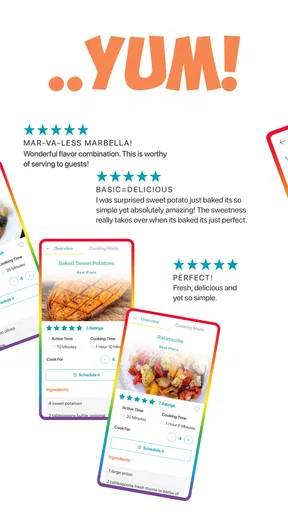
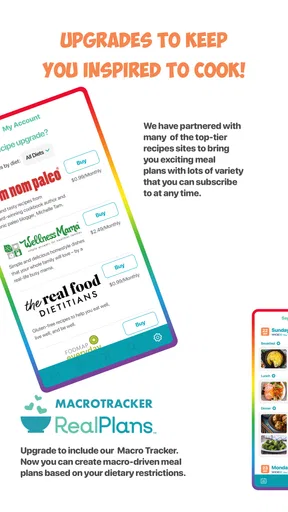
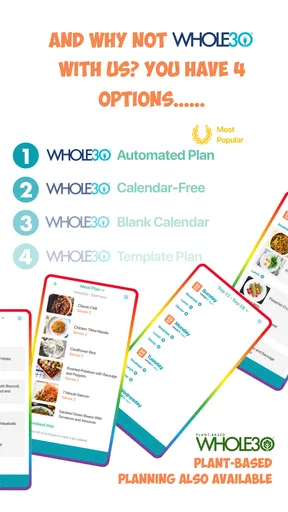

 Analysis by AppCompare
I judge a meal-planning app less by how many recipes it promises than by whether I can use it when I’m tired, distracted, or trying to get dinner onto the table. Real Plans is aimed at that everyday problem: it helps organize meals and the ingredients they require, rather than leaving the whole week to memory. As a Food & Drink app from Real Plans Inc., it has a 4.5 average from around 474 ratings and over 50,000 installs. It is free to download, rated for Everyone, and offers in-app purchases ranging from $0.99 to $144.99 per item, so I’d check what is included before building a routine around it.
Making meal planning easier to follow
Have you ever found yourself standing in front of your fridge, staring blankly at its contents, wondering what on earth you should make for dinner? Trust me, we've all been there. That's where Real Plans - Meal Planner swoops in to save the day. This app is like having your very own culinary assistant, helping you plan meals with ease and precision.
Diving into the Real Plans app is like opening a treasure chest packed with recipes, meal plans, and shopping lists. The sign-up process is straightforward, and once you’re in, you can customize your dietary preferences. Whether you’re vegan, gluten-free, or just trying to eat a bit healthier, Real Plans has got you covered.
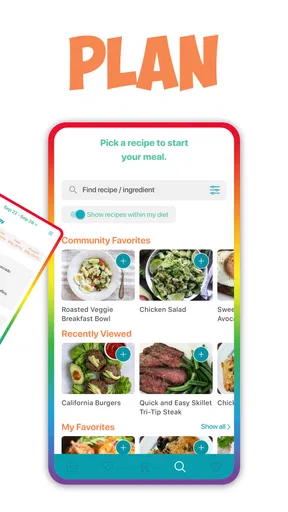
After setting up your profile, the app offers a plethora of recipes that align with your chosen dietary needs. The sheer number of options might seem overwhelming, but don’t worry, the app's intuitive design makes navigation a breeze.
Readability, navigation, and finding a workable plan
The useful question is not simply whether there are many recipes, but whether I can narrow the choice to something that fits tonight. Dietary preferences help shape the options, yet a large pool can still create decision fatigue. I’d start with a small number of meals I already know I’m willing to cook, then fill gaps in the week with recipes that suit the time and ingredients I actually have. That keeps planning from turning into another open-ended browsing session.
Compared with a handwritten list or a basic calendar, Real Plans brings recipes, planned meals, and grocery needs into one workflow. A notes app can be quicker if all I need is a few reminders, and a general recipe site may be better for browsing without committing to a schedule. The advantage here is the connection between choosing meals and preparing to shop; the trade-off is that the app asks me to do more setup than a bare list.
Features That Stand Out
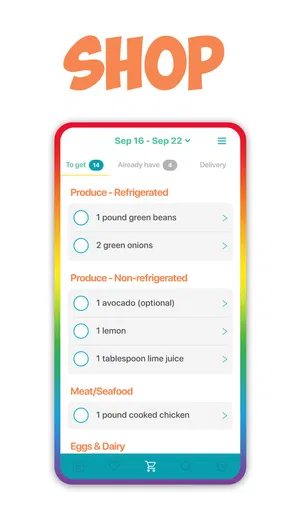
One of my favorite features is the smart shopping list. As you choose your meals for the week, the app automatically generates a shopping list. This list isn’t just a simple note; it’s organized by grocery aisle! It’s like having a map to navigate the supermarket chaos.
Worth Reading Before You Choose

Flipboard Shows What News Apps Must Do Beyond the Feed

Switching to Android Auto Means Rethinking Your Driving Routine

Google Calendar Makes a Crowded Week Easier to Manage

Ludo King Makes the Most of the Minutes Between Plans

Baby Panda World Brings Quick Play to Modern Phones, but Its Game Library Feels Busy

ESPN’s Live Game View Makes Following Close Games Easier
That aisle organization is especially helpful when I’m shopping from a plan rather than wandering for inspiration. My practical tip is to review the list before leaving home: check what is already in the pantry and fridge, and make sure the planned dishes still fit the week. A generated list saves transcription, but it cannot decide whether I have enough of a staple left or whether an ingredient is about to expire. A quick check can prevent duplicate purchases and last-minute substitutions.
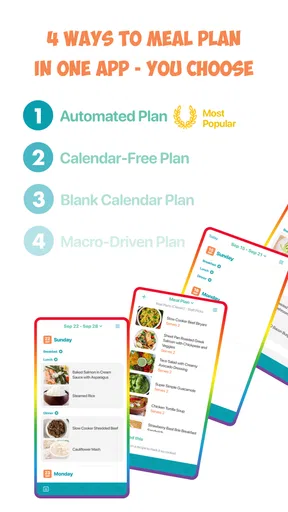
Another nifty feature is the calendar integration. You can plan meals for the week or even the entire month, and the app will sync with your calendar. This way, you’ll always know what’s on the menu, and you can adjust plans if something unexpected pops up.
Long-range planning is most useful to me as a flexible outline, not a promise that every dinner will happen exactly as scheduled. A busy week can change quickly, so I’d plan the meals that need advance shopping while leaving a little breathing room for leftovers or an unplanned evening. If a calendar entry helps me remember what I intended to cook, that’s valuable; if I treat the plan as a rigid timetable, it can become one more thing to feel behind on.
For those of us who love a bit of personalization, Real Plans allows you to add your own recipes. So, if you’ve got grandma’s secret lasagna recipe, you can include it in your meal rotation. The app will even adjust portion sizes and ingredients based on your family’s needs.
Adding familiar recipes can make the planner feel less like a separate catalogue and more like a record of how the household really eats. I’d use that option for dependable dishes that recur often, rather than trying to enter every recipe at once. A sensible first test is to add one family favorite, adjust its servings, and see whether the resulting ingredient quantities make shopping easier. That reveals whether the app suits my cooking habits before I invest time organizing a large personal collection.
Motor and sensory considerations while cooking
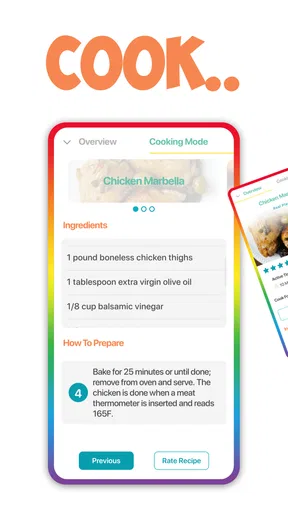
Once you’ve planned your meals and done your shopping, it’s time to cook. The app provides step-by-step instructions for each recipe, complete with cooking times and tips. If you’re like me and prone to burning toast, these detailed guides are invaluable.
Step-by-step directions can reduce the mental load of switching between a recipe and the next kitchen task. They are particularly useful when I’m learning an unfamiliar dish or cooking while keeping an eye on something else. Still, a phone is not always the easiest tool to handle with wet hands, flour on my fingers, or a hot pan demanding attention. I’d check the recipe before starting, gather ingredients and equipment first, and avoid relying on a screen interaction at the moment when timing matters most.
For people who prefer fewer visual or decision demands, the clearest advantage is having a chosen recipe and plan ready instead of searching through multiple pages at dinnertime. The experience will still depend on an individual’s comfort with the app’s text and controls; I wouldn’t assume that a guided recipe alone makes every kitchen task accessible. A printed or separately displayed recipe may be more comfortable for someone who finds phone use tiring, while the app can still help with planning and shopping beforehand.
Real Plans in an ordinary week
Picture a Sunday evening when I have a short window to plan before the next week gets busy. I can choose a few dinners, put them on the calendar, and use the generated aisle-based list to check what needs buying. If one evening later fills up, I can swap the meal rather than throw away the whole plan. This is where the app’s pieces work together: the plan guides the shop, and the ability to change it makes the plan more forgiving.
It is a better fit for someone who wants to cook at home regularly but loses time deciding what to make or remembering ingredients. It may also help households balancing different dietary preferences, provided the recipes and planning approach fit their needs. On the other hand, I’d skip it if I mostly eat out, prefer improvising from whatever is on hand, or only need a simple grocery checklist. Someone who already has a reliable recipe collection and enjoys planning on paper may not gain enough to justify moving that habit into an app.
One trade-off is that an organized plan can encourage buying for recipes rather than using up what is already available. I’d plan around perishable ingredients first and leave room to carry an ingredient across more than one meal when that makes sense. Another is the time required to personalize the experience: dietary choices and saved recipes can make later decisions more relevant, but setup is still work. The strongest routine is probably a modest one—plan a few dinners, review the list, and adjust as the week changes—rather than attempting a perfect month of meals from the outset.
Flexibility, cost, and remaining barriers
And for those nights when you’re just too tired to cook, the app’s flexibility shines. You can easily swap meals or adjust servings, which is perfect for impromptu dinner guests or when you’re just not feeling the quinoa bowl you planned.
That flexibility matters because a meal planner should help me recover when plans change, not make me feel obliged to follow a schedule. A useful habit is to keep one low-effort meal in the week and move a more involved recipe to a night with more time. Changing servings can also make a planned dish more practical for a household, though I’d still use judgment when scaling recipes: cooking time and pan size do not always change in the same simple way as ingredient amounts.
The app is free to download, but in-app purchases range from $0.99 to $144.99 per item. That broad range makes it sensible to inspect the purchase details and decide what I actually need before paying; I would not assume that every planning option is included at no cost. It runs on OS 7.0 or later, and its current version is 9.15.0. The app was released on October 8, 2015, and its Everyone content rating is a broad age classification, not a promise that every person will find the interface comfortable.
In practical terms, the main barriers are the effort of initial setup, the possibility of feeling overwhelmed by many recipe choices, and the need to interact with a phone while planning or cooking. If I have limited dexterity, low vision, or sensory sensitivities, I’d try the core tasks—finding a recipe, reading its directions, changing a plan, and checking a shopping list—before relying on it every day. A companion, a larger screen, or a paper copy of the final recipe may suit some situations better. Those workarounds are not a flaw in someone’s cooking; they are sensible ways to choose the format that makes the task manageable.
Who will get the most from it
What I’d want to know before committing is whether the app can handle the way I actually eat, whether a planned meal can be changed when the week shifts, and whether the shopping list saves enough effort to be worthwhile. Its dietary preferences, recipe planning, list generation, calendar use, and ability to add personal recipes address those practical needs. The best way to judge the fit is to test one ordinary week rather than plan an ambitious month: choose a few dinners, inspect the shopping list, and see whether the instructions work for your kitchen routine.
Real Plans is most persuasive when the problem is coordination: deciding what to cook, remembering what to buy, and keeping a plan flexible as life intervenes. It is less compelling as a spontaneous cooking discovery tool or a minimal list app. I like that its planning features connect to real tasks, but I’d keep expectations grounded: the app can organize decisions, not shop the pantry or cook dinner for me. Anyone comparing it with a calendar and notes should ask whether having recipes and grocery planning together is worth the extra setup.
A grounded recommendation
In today’s fast-paced world, meal planning can feel like a luxury. But with Real Plans - Meal Planner, it becomes an accessible and enjoyable part of your weekly routine. The app’s user-friendly design, coupled with its robust feature set, makes it a must-have for anyone looking to streamline their cooking process.
So, if you’re tired of the nightly dinner dilemma and want to bring some organization—and maybe even a little excitement—back into your kitchen, give Real Plans a try. Your future self will thank you when dinner is ready without a hitch.
My recommendation is more specific: try it if the recurring hassle is planning and shopping, and begin with a small, realistic set of meals. Keep it only if the calendar and generated list genuinely reduce your weekly mental load. If you prefer spontaneous cooking, already have a system that works, or find mobile recipe reading uncomfortable, a simpler approach may be the kinder fit. For the right routine, the app can turn dinner from a daily blank page into a plan that is useful without being rigid.
Pros
- Customizable meal plans for any diet.
- User-friendly interface with intuitive design.
- Extensive recipe database with diverse options.
- Grocery list feature syncs with meal plans.
- Adjustable portion sizes for accurate servings.
Cons
- Subscription required for full access.
- Limited offline functionality.
- Occasional syncing issues with some devices.
- Notifications can be overwhelming at times.
- No integration with some popular fitness apps.
FAQs for Real Plans - Meal Planner
What is Real Plans - Meal Planner and how does it work?
Real Plans is a comprehensive meal planning app designed to simplify meal preparation and grocery shopping. It offers customizable meal plans tailored to various dietary preferences, including vegetarian, paleo, and keto. Users can select recipes, adjust serving sizes, and generate shopping lists automatically. The app also provides nutritional information and step-by-step cooking instructions.
Is the Real Plans app suitable for people with dietary restrictions?
Yes, Real Plans is highly accommodating for users with dietary restrictions. It supports various diets like gluten-free, dairy-free, vegetarian, vegan, and more. Users can customize the meal plans according to their specific dietary needs, ensuring they consume meals aligned with their health goals or medical requirements.
Does Real Plans offer a free version or trial period?
Real Plans typically offers a trial period where users can explore its features without commitment. After the trial, users need to subscribe to continue accessing the full suite of features. The subscription provides unlimited meal plans, access to diverse recipes, and personalized support, making it a valuable investment for dedicated meal planners.
Can I use Real Plans on multiple devices?
Yes, Real Plans can be accessed across multiple devices. The app is available on both Android and iOS platforms, and users can sync their accounts to ensure seamless access to meal plans, shopping lists, and recipes, whether on a smartphone, tablet, or computer. This feature enhances convenience for users on the go.
How does Real Plans help with grocery shopping?
Real Plans simplifies grocery shopping by generating detailed shopping lists based on your selected meal plans. These lists categorize items for easy navigation and allow users to check off items as they shop. The app also provides the option to adjust quantities and substitute ingredients, ensuring that grocery shopping is efficient and tailored to household needs.


